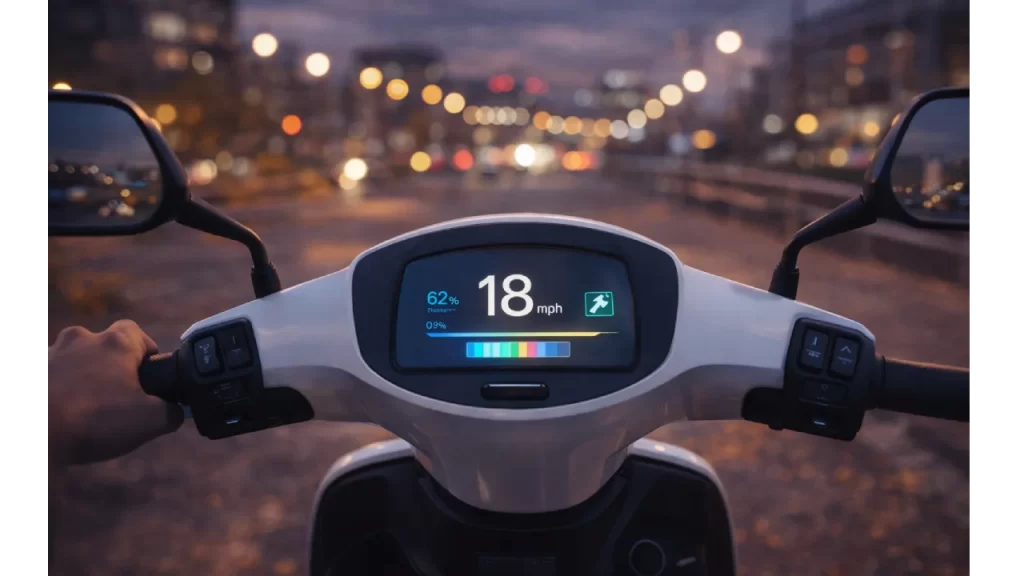

Remember when riding a scooter was simple? A thumb throttle, maybe a basic light, and you were off. Today, the latest electric scooters look more like gadgets. Their centers are dominated by colorful digital displays showing your speed, battery life, navigation, and even your riding efficiency.
This shift from simple to smart is happening fast. As someone who tests urban tech, I’ve watched these dashboards evolve from simple LED panels to full-color touchscreens. But it makes me wonder: Are we adding helpful tech, or are we just putting a smartphone on our handlebars?
The Clear Benefits: No More Guessing Games
Let’s start with the good stuff. A clear digital display solves some real, everyday problems.
- Precision Over Guesswork: That vague battery icon that leaves you stranded? Gone. Modern dashboards give you a precise percentage and, crucially, an estimated remaining range. This isn’t just convenient; it’s a safety feature. Knowing you have 3 miles of battery left means you can plan a safe route home, not just hope you make it.
- Awareness Creates Safer Habits: Seeing your speed in clear, bright digits—18 mph—makes you conscious of it. In cities with 15 mph scooter limits, this instant feedback helps you self-regulate and ride more responsibly around pedestrians. It turns a guess into a fact.
The best displays do this with glanceable clarity. In a split second, you get the information you need without digging through menus.
The Smartphone Connection: A Powerful, and Risky, Leap
This is where things get interesting. When your scooter pairs with an app via Bluetooth, it unlocks a new world. You can track your route on a map, lock the scooter digitally, analyze your trip history, and get firmware updates that improve performance over the air.
But this power has a cost: distraction.
The very screen designed to inform you can also tempt you. Is checking that turn-by-turn navigation prompt safe while moving? What about glancing at a detailed power output graph? That split-second look away is a risk on busy streets.
Here’s the key insight: The most valuable smart features are the ones that work for you in the background. Think of automatic lights that turn on at dusk, or regenerative braking that adjusts based on your battery level. You benefit without ever touching the screen.
Glanceable vs. Grabby: How to Spot the Difference
Not all tech is created equal. After trying various models, I’ve found the usefulness comes down to design intent.
Look for GLANCEABLE tech:
✅ A large, high-contrast speed readout.
✅ A simple, progressing battery bar.
✅ Bright, automatic LED headlights and brake lights.
✅ An intuitive, uncluttered layout.
Be wary of GRABBY tech:
❌ A screen cluttered with tiny, complex metrics.
❌ Maps that require street-level scrutiny to follow.
❌ Social notifications or message alerts on the display.
❌ Menus that require stopping to navigate safely.
The Verdict: Helpful, But Keep Your Eyes on the Road
So, do high-tech displays actually help? Yes, but with a major caveat.
They are incredibly helpful when they provide essential, glanceable data that improves safety and planning—like a precise battery gauge and a clear speedometer.
They become a problem when they try to do too much, inviting you to interact instead of just informing you. The best “smart” scooter feels like a helpful tool. The worst feels like a demanding gadget.
Final thought: When you’re looking at a new scooter, don’t just count the features. Sit on it. Can you read the core information instantly, in bright sunlight, without focusing on it? If the answer is yes, you’ve found a good one. The road ahead should always be your main focus, not the dashboard.
👉 Looking for more EV scooter guides?
Visit our Homepage for the latest updates.